Using a Vodafone Mobile Broadband (ZTE K5161z) 4G USB dongle on Linux
There are plenty of these little devices around, and as of the start of 2026 they sell for £25 on Amazon unlocked for any network. I couldn’t figure out how to get the thing to actually work though on an otherwise failing boring Linux install.
It seems likely that the current glut of them is either because of customer returns from Vodafone, or just unused devices as 5G dongles are rolled out. But they work perfectly well still.
USB 4G devices like this are odd little beasts: this, and several other models
known on the market, like some Huawei models, are effectively a stick shaped
router which shows up as a combined mass storage device and a USB ethernet
device. On insertion, dmesg tells us:
[Feb 5 14:53] usb 1-2: new high-speed USB device number 6 using xhci-hcd
[  +0.139388] usb 1-2: New USB device found, idVendor=19d2, idProduct=1225, bcdDevice=58.13
[  +0.000010] usb 1-2: New USB device strings: Mfr=2, Product=4, SerialNumber=5
[  +0.000003] usb 1-2: Product: Vodafone Mobile Broadband
[  +0.000003] usb 1-2: Manufacturer: Vodafone,Incorporated
[  +0.000003] usb 1-2: SerialNumber: 1234567890ABCDEF
[  +0.005580] usb-storage 1-2:1.0: USB Mass Storage device detected
[  +0.000188] usb-storage 1-2:1.0: Quirks match for vid 19d2 pid 1225: 1
[  +0.000042] scsi host0: usb-storage 1-2:1.0
[  +3.670038] usb 1-2: USB disconnect, device number 6
[  +0.380744] usb 1-2: new high-speed USB device number 7 using xhci-hcd
[  +0.143507] usb 1-2: New USB device found, idVendor=19d2, idProduct=1405, bcdDevice=58.13
[  +0.000007] usb 1-2: New USB device strings: Mfr=2, Product=4, SerialNumber=5
[  +0.000003] usb 1-2: Product: Vodafone Mobile Broadband
[  +0.000002] usb 1-2: Manufacturer: Vodafone,Incorporated
[  +0.000002] usb 1-2: SerialNumber: 1234567890ABCDEF
[  +0.201730] cdc_ether 1-2:1.0 eth1: register 'cdc_ether' at usb-xhci-hcd.0-2, ZTE CDC Ethernet Device, 34:4b:50:00:00:00
[  +0.000957] usb-storage 1-2:1.2: USB Mass Storage device detected
[  +0.000385] scsi host0: usb-storage 1-2:1.2
[  +1.010171] scsi 0:0:0:0: CD-ROM            Vodafon  USB SCSI CD-ROM  2.3  PQ: 0 ANSI: 2
[  +0.000567] sr 0:0:0:0: Power-on or device reset occurred
[  +0.002185] sr 0:0:0:0: [sr0] scsi-1 drive
[  +0.002111] sr 0:0:0:0: Attached scsi CD-ROM sr0
[  +0.000366] sr 0:0:0:0: Attached scsi generic sg0 type 5
[  +0.030690] scsi 0:0:0:1: Direct-Access     Vodafon  MMC Storage      2.3  PQ: 0 ANSI: 2
[  +0.003430] sd 0:0:0:1: Attached scsi generic sg1 type 0
[  +0.000233] sd 0:0:0:1: Power-on or device reset occurred
[  +0.000377] sd 0:0:0:1: [sda] Media removed, stopped polling
[  +0.000307] sd 0:0:0:1: [sda] Attached SCSI removable disk
[  +0.371026] ISO 9660 Extensions: Microsoft Joliet Level 1
[  +0.000250] ISOFS: changing to secondary root
The mass storage device provides a set of (unnecessary) drivers, and also supports the Micro SD card if you wanted to use it.
Assuming you’ve got a SIM card installed, it should just come up and provide internet access. The light starts off as red and once it gets a signal (this does take some time), will change to blue. If not, you might need to bring up the new interface, e.g.:
$ sudo ip link up eth1
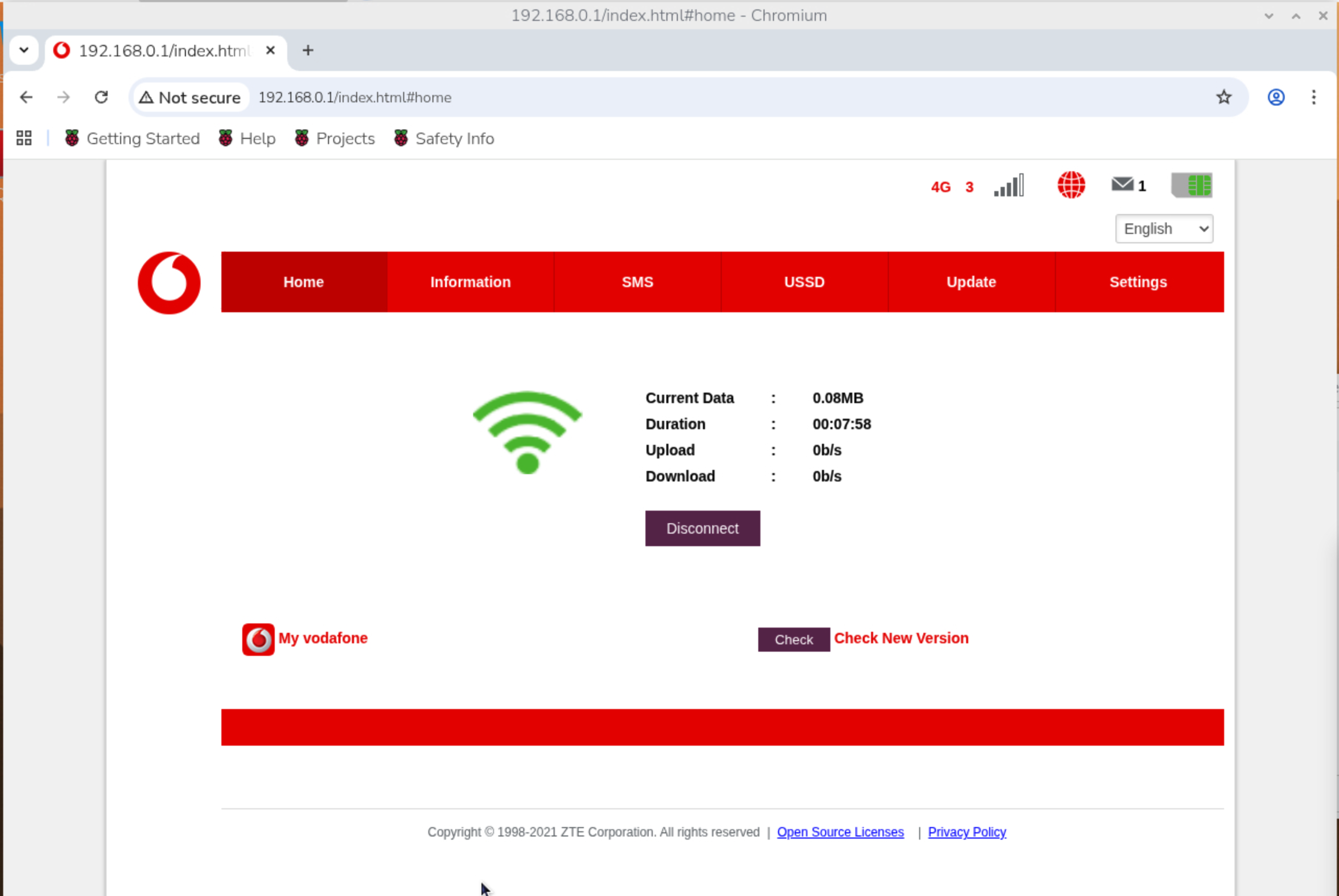
The interface will then get an IP from the dongle. You can access the
configuration interface by going to .1 on whatever the IP range you got
assigned (maybe 192.168.0.*, maybe 192.168.6.*) and change some settings,
read any SMS messages, etc. Once configured, I’ve found it comes back up when
rebooting.
Hopefully this solves someone else spending ages going around in circles trying to figure out how you might use them, especially if like me, it didn’t come up automatically. Unfortunately it was much easier to find the wrong answer to how this particular device works than the correct one.